


View cart
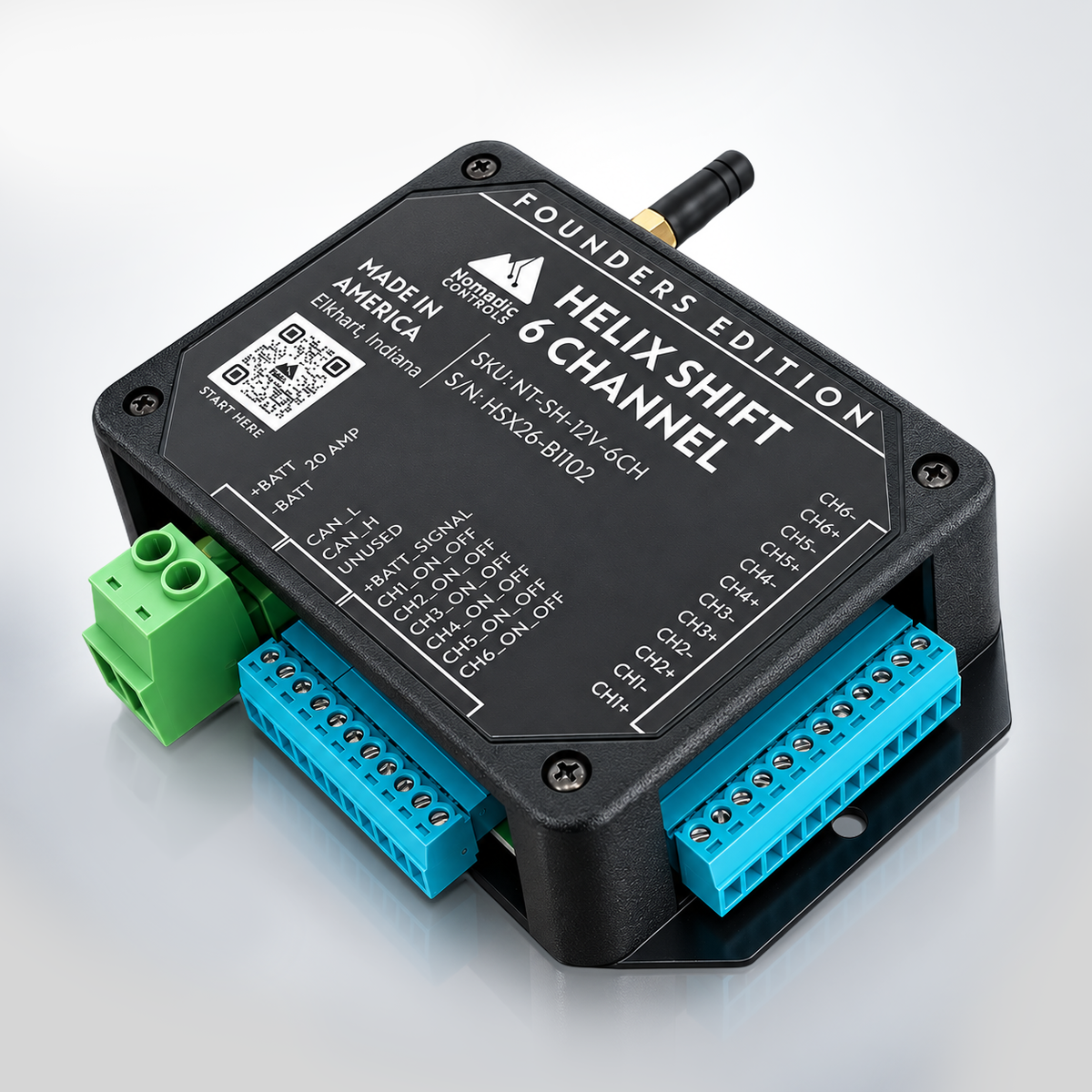
Helix Shift 6CH six-channel 12V smart DC controller for vans and RVs
Nomadic Controls Founders Edition
Helix Shift 6CH 12V Smart DC Controller

Six Circuits. One Smarter Control Layer.

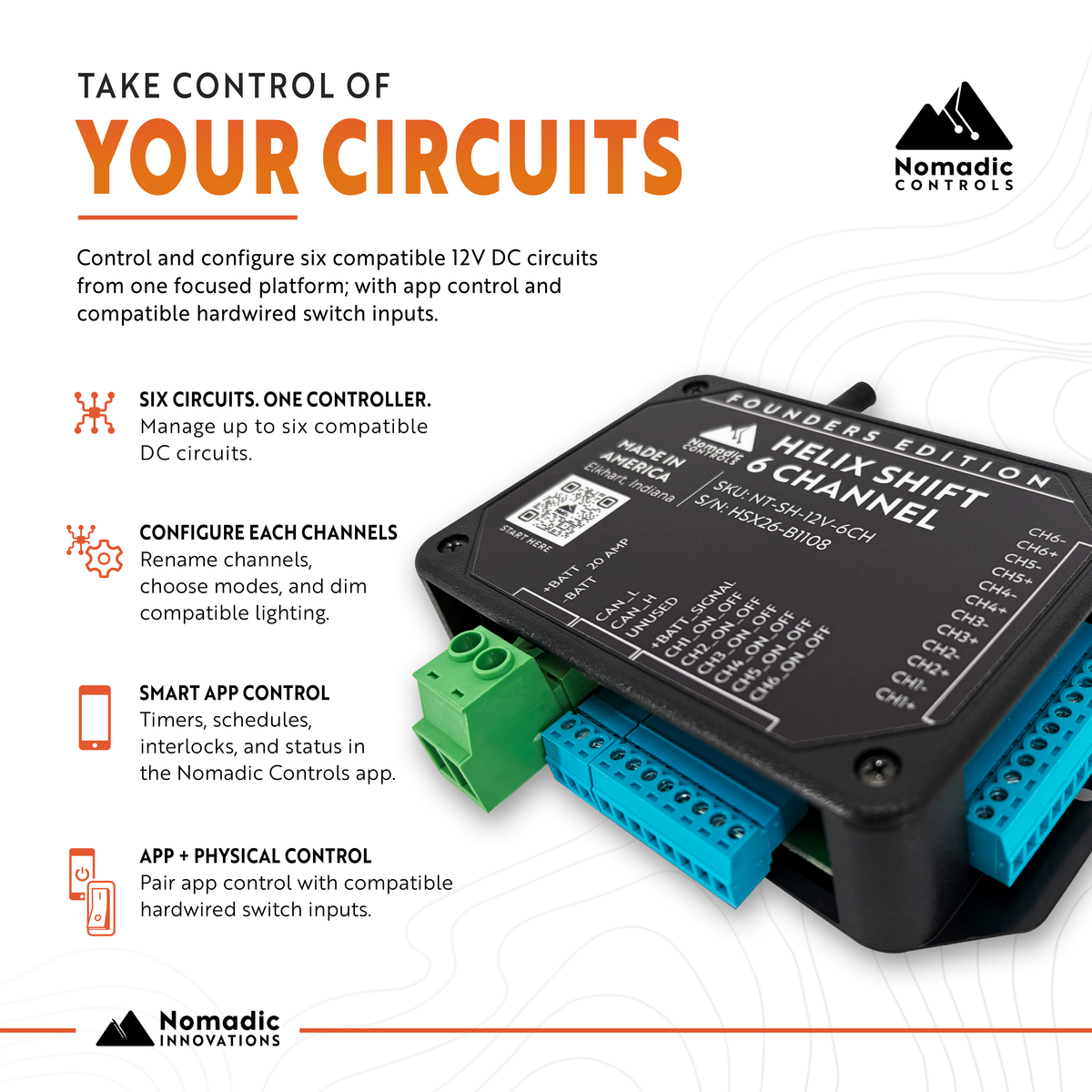
Control six compatible 12V DC circuits in vans, RVs, campers, and mobile builds through one focused smart controller.

Configure and operate channels through the Nomadic Helix Controls app while keeping six compatible hardwired momentary-switch inputs for local control.

01
6 Channels Independent 12V DC outputs
02
Helix App Operate + configure channels
03
Hardwired Inputs 6 momentary-switch inputs
04
1-Year Warranty Backed by Nomadic Innovations

Founders Edition: Limited early-release availability. App interface and supporting documentation may evolve through approved updates.

Beyond Basic 12V Switching

What Makes Helix Shift 6CH Different From Basic 12V Switching

Switching is only the starting point. Shift 6CH adds structure around compatible 12V DC circuits through five practical capabilities.

01
Organize

Six circuits. Names that make sense.

Give each output a descriptive name so the dashboard reflects the actual build instead of leaving the owner or technician to remember what “Switch 3” controls.

Why It Matters

Clear channel names reduce guesswork during daily use, commissioning, handoff, and future service.

Next
The Helix Interface

See how these capabilities come together in the app.

The Helix Interface

Meet the Helix Shift 6CH Dashboard.

The Nomadic Helix Controls app brings all six Shift 6CH channels into one organized view, with individual control and direct access to the controller's primary configuration, automation, and Status tools.

Current Interface Six-Channel Home Dashboard
01 / 02
Nomadic Helix Controls app dashboard for Helix Shift 6CH showing six channel rows, individual controls, and Timer, Interlock, Mode, Rename, and Status tools
Home Dashboard

Six channels up front. Deeper tools one tap away.

Each channel row can show its assigned name, operating mode, individual power control, current in Standard and Dimmable modes, and brightness when applicable.

01 Timer
02 Interlock
03 Mode
04 Rename
05 Status
Rename

Make the interface match the build.

Replace generic labels such as “Switch 1” with useful names such as “Bedroom” so the finished system is easier to operate, hand off, and service.

Helix Shift 6CH Rename screen showing Bedroom and the remaining five channel names
6 Channel Rows Organized in one dashboard
5 Primary Tools Timer · Interlock · Mode · Rename · Status
1 Control Interface Built around the actual circuit layout

Screens shown reflect the app version used for this page. Interface appearance or available functions may change through approved software updates.

Helix Shift 6CH Electrical Architecture

Six 12V DC Channels. One Shared 18A Output Envelope.

Each Shift 6CH output is independently controlled, but the six channels share one controller-wide current limit. Plan both the individual load and the loads that may operate at the same time.

Output Channels 6 Matched CH+ / CH− pairs
Per Channel 8A Maximum individual output
Combined Output 18A Across all active outputs
Installed Fuse 20A MINI blade fuse
8A per channel does not mean 48A of controller capacity.

Any individual output may operate up to 8A, but the combined current of all active outputs must remain at or below 18A.

Six Independently Controlled Outputs Individual channels feed one shared controller limit.
12V DC
CH 01 CH1+ / CH1− ≤ 8A
CH 02 CH2+ / CH2− ≤ 8A
CH 03 CH3+ / CH3− ≤ 8A
CH 04 CH4+ / CH4− ≤ 8A
CH 05 CH5+ / CH5− ≤ 8A
CH 06 CH6+ / CH6− ≤ 8A
Shared Output Envelope 18A MAX COMBINED Total current across all active channels
Circuit Protection 20A protection does not equal 20A of usable output.

Shift 6CH uses an installed 20A MINI blade fuse and requires a separate 20A DC-rated source-side fuse in the positive supply conductor. Nomadic Controls also recommends appropriately sized DC-rated protection between each output channel and its connected load.

Hardware defined. Next: how app control and physical switches work together.
App + Hardwired Switch Control

Use the App. Keep the Switch.

Helix Shift 6CH combines digital control through the Nomadic Helix Controls app with six compatible normally-open momentary switch inputs for local control inside the vehicle.

Camper van control scene illustrating Helix Shift 6CH app control and compatible hardwired switch control
Two Control Paths Digital when you want it. Physical when you reach for it.
Same Channel · Different Access

Smart control should add options, not remove familiar ones.

Use the app for configuration, automation, Status information, and digital channel control. Add a compatible physical switch where immediate tactile operation makes more sense.

01 Local Control

Hardwired Switch

One compatible normally-open momentary switch input is available for each Shift 6CH output channel.

Immediate · Familiar · Local
Helix Shift 6CH Same Channel Controller receives the command
02 Digital Control

Helix App

Operate the channel and access its available configuration, automation, and controller-reported information.

Digital · Configurable · Visible
Important Distinction The hardwired switch is a control input—not the load path.

A compatible switch sends a command to Shift 6CH. The connected load remains controlled through its assigned Shift output channel. Hardwired switch inputs do not provide electrical isolation.

Why It Matters

Put physical control where people naturally use it.

An entry light or bedside circuit can have a familiar local switch while the same channel remains available through the Helix interface. During commissioning, confirm that the switch commands the intended channel and that the app shows the expected channel state.

Two ways to reach the channel. Next: configure how that channel behaves.
Helix Shift 6CH Channel Configuration

Configure Each Channel Around the Job.

Select the output you want to configure, choose a supported operating mode that matches the connected load, then verify the result on the Helix dashboard.

01
Select Choose the Channel
Helix Shift 6CH channel selection screen showing six output channels and their assigned operating modes

Start with the correct circuit.

Open Mode and select the output you intend to configure. Review the current assignment before making a change.

Match the app channel to the physical output and connected equipment. Change operating modes only while the selected output is commanded OFF.
02
Choose Select the Mode
Helix Shift 6CH operating mode selection showing Standard, Dimmable, Triple Burst Flash, Single Flash, and Turn Signal Flash

Match the mode to the load.

Shift 6CH provides five selectable operating modes for compatible loads.

Standard Dimmable Triple Burst Flash Single Flash Turn Signal Flash
03
Verify Confirm the Result
Helix Shift 6CH dashboard showing Bedroom configured in Dimmable mode at 50 percent brightness

Verify it on the dashboard.

Confirm that the intended mode appears on the intended channel and test the actual load response before relying on the configuration in normal operation.

Channel Bedroom
Mode Dimmable
Brightness 50%
Configuration Rule

Available does not mean universal.

Standard, Dimmable, and flashing modes must be used only with compatible loads. A flash-mode name does not establish compliance for turn signals, hazard lights, emergency lighting, or other regulated vehicle-lighting applications.

Channel behavior configured. Next: decide when that channel should operate.
Helix Shift 6CH Automation

Automation That Serves the Build.

Add timing and coordination where they make the system easier to use.

Shift 6CH provides Cloud Schedule, Countdown, and Interlock tools through the Nomadic Helix Controls app. Use them deliberately around compatible circuits after each connected channel has been configured and functionally verified.

01 · Cloud Schedule

Put a command on the clock.

Send an ON or OFF command to a selected channel at a configured time. Saved schedules can use repeat days or an Only Once designation where supported by the interface.

01 Time
02 Channel
03 Action
Built for repeatable or one-time time-based commands.
Cloud Schedule Helix Shift 6CH Cloud Schedule screen showing scheduled time, selected channel and ON or OFF action
Helix Shift 6CH Countdown screen for a delayed one-time channel action
02 · Countdown

Delay one action.

Set a delay for a one-time channel-state change without creating a recurring schedule.

Duration → Channel → Action
Helix Shift 6CH Interlock screen showing selected channels in an Interlock group
03 · Interlock

Coordinate selected channels.

Group channels when they should operate within a coordinated relationship. When one grouped channel is ON, the others in that group are intended to remain OFF.

Operational coordination
Before You Automate

Verify the channel first.

Complete the initial functional test for every connected channel before creating an automated command. Test each new Schedule, Countdown, or Interlock configuration under controlled conditions before relying on it routinely.

Interlock is an operating convenience, not a safety interlock. Automation does not replace an electrical disconnect, emergency shutoff, mechanical safeguard, or independently designed safety system.

Timing and coordination established. Next: see what each channel and the controller are reporting.
Channel + Controller Visibility

See What Each Channel Is Doing.

Everyday channel context up front. Deeper controller information when you need it.

Start with individual channel information on the Helix dashboard, then open Status for controller-reported Fault, CAN Status, and Board Status information when something needs closer attention.

01 · Channel View

Everyday channel context.

Helix Shift 6CH channel view showing channel name, operating mode, supported current information and control

The dashboard keeps identifying and operating information beside each individual channel control so the six outputs remain easier to understand during everyday use.

01

Channel Name Identify the assigned circuit.

02

Operating Mode See the mode assigned to that channel.

03

Current Information Individual current is displayed in Standard and Dimmable modes.

04

Brightness Visible where applicable to a compatible Dimmable-mode load.

02 · Status

Go deeper when something needs context.

Helix Shift 6CH Status screen showing Fault, CAN Status and Board Status areas

Status separates different controller-reported information so one message is not mistaken for the condition of the entire controller.

01

Fault Controller-detected electrical or operating conditions.

02

CAN Status Information associated with the optional CAN communication interface.

03

Board Status Reported operating state of the I/O Board.

Fault Examples

Know what condition the controller is reporting.

Fault information helps narrow the area to investigate. It does not automatically identify every possible root cause.

01 System Low Voltage
Helix Shift 6CH Status screen reporting System Low Voltage

A controller-reported system supply-voltage condition.

02 System Over Voltage
Helix Shift 6CH Status screen reporting System Over Voltage

A controller-reported system supply-voltage condition.

03 System Over Current
Helix Shift 6CH Status screen reporting System Over Current

A controller-wide current condition, distinct from a fault assigned to one output channel.

Channel-Level Fault Identification
Overcurrent can also be identified by the affected channel.

Shift 6CH can report Channel 1 Over Current through Channel 6 Over Current separately, helping distinguish an individual-output condition from a system-level overcurrent condition.

Current Display

Individual-channel current is displayed in Standard and Dimmable modes and is informational. Other operating modes may display 0.00 A because current monitoring is not provided in those modes.

Service Safety

A displayed current value, OFF command, or Status indication does not electrically isolate the controller or connected wiring. Disconnect and isolate the applicable source power before service.

Channel and controller context established. Next: make the finished installation understandable after it leaves the shop.
Helix Shift 6CH Builder Workflow

Build It Once. Leave It Understandable.

A good van or RV electrical installation should still make sense after it leaves the shop.

Tie each physical Shift 6CH channel to a clear load assignment, app identity, configuration, and build record so commissioning, customer handoff, and future service do not depend on memory.

Professional van and RV builder electrical installation environment
Build Record Mindset Hardware + App Identity + Documentation
01 Connected Load
02 Operating Mode
03 Control Assignment
04 Build Record
01 · Plan

Assign the channel before terminating the wiring.

Record the physical channel, connected load, expected current, intended operating mode, and any planned hardwired switch location before the circuit is completed.

02 · Commission

Match the app to what was actually wired.

Configure and test one connected channel at a time. Compare the app name, physical channel number, connected equipment, and completed wiring record before moving to the next output.

03 · Preserve

Leave useful information with the vehicle.

Keep corrected channel names, operating modes, wiring and control assignments, test results, and useful installation records available for customer handoff and future service.

Builder Takeaway

The customer should not need the original installer's memory.

Shift 6CH does not replace good electrical workmanship or documentation. It gives the builder a clear control structure that can remain tied to the physical installation from initial channel planning through future troubleshooting or controller replacement.

Installation context preserved. Next: make sure the planned loads actually fit the controller.
Helix Shift 6CH Application Fit

Know Where Shift Fits.

Current is only one part of compatibility.

Helix Shift 6CH is a six-channel 12V DC controller for compatible circuits in vans, RVs, campers, and mobile electrical systems. The connected equipment also needs to fit the controller's voltage, polarity, startup-current, load-type, and control requirements.

01 · Direct Output

Compatible 12V DC loads.

A load may connect directly to a Shift output only when its voltage, running current, startup or inrush current, polarity, and required control method all fall within the published requirements.

8A maximum per channel · 18A maximum combined
02 · Relay Control

Control the relay coil—not the larger load.

A compatible 12V automotive relay coil may be controlled in Standard mode when the relay includes a suppression diode or another approved flyback-suppression device.

The relay-controlled load uses its own properly fused power circuit.
03 · Different Architecture

Some loads should stay off the direct outputs.

Use another control approach when the supply, load behavior, current demand, safety requirements, or equipment type does not match the approved Shift 6CH application.

Staying below an amp number does not automatically establish compatibility.
Current Planning Aid

Check a six-channel simultaneous-current plan.

Enter the current each active channel could contribute in the operating case you want to evaluate.

This calculator checks current only. It does not determine load compatibility or evaluate voltage, polarity, startup or inrush current, operating mode, wiring, circuit protection, environmental conditions, or required safety safeguards.

Direct-Output Boundaries

Stop and use a different approach when the application falls outside the published design.

01
Wrong supply voltage

Do not use Shift 6CH with AC mains power or a DC source outside its approved 11.0–16.0V input range.

02
Current limits are exceeded

Do not directly connect a load above 8A on one channel or operate active outputs above 18A combined.

03
Load behavior is unconfirmed

Motors, pumps, solenoids, heaters, compressors, ignition circuits, and other inductive, high-inrush, or heat-producing loads should not be connected directly unless that load type is specifically confirmed compatible.

04
The function is safety-critical

Shift 6CH should not be the sole control or safety device for braking, steering, propulsion, restraint, fire suppression, medical, life-support, or other safety-critical equipment.

Application Takeaway

The goal is not to put every vehicle circuit on Shift.

Use it deliberately for the compatible 12V DC circuits that benefit from organized control, configuration, automation, and visibility.

Right loads. Right architecture. Next: Shift 4CH or Shift 6CH?
Choose the Right Shift

Helix Shift 4CH vs Shift 6CH

The biggest difference is not two extra channels.

Shift 4CH is built around dry-contact relay switching. Shift 6CH is built around direct controlled 12V DC outputs. Choose the architecture that matches the circuit rather than choosing by channel count alone.

04
Helix Shift Smart Relay Controller
Dry Contact
Externally Supplied Circuit COM NO / NC
Shift 4CH

Four relay channels for circuits that need dry-contact switching.

Each channel provides NO, COM, and NC contacts. The relay changes the state of an externally supplied circuit rather than providing the load voltage itself.

4 Relay Channels
7–32V DC Module Power
NO/NC Contact Options
10A Resistive / Channel
Choose 4CH When
  • Dry-contact switching fits the electrical design.
  • You need normally-open or normally-closed contact behavior.
  • The actual load power should remain in an externally supplied circuit.
View Helix Shift 4CH
06
Helix Shift 12V Smart DC Controller
Current Product
12V Source CH+ / CH− Compatible Load
Shift 6CH

Six controlled output pairs for compatible 12V DC circuits.

Shift 6CH directly controls compatible loads through six matched CH+ and CH− outputs while adding per-channel configuration, Dimmable mode, hardwired momentary-switch inputs, automation, and controller-reported operating information.

6 DC Outputs
8A Max / Channel
18A Max Combined
DIM Dimmable Mode
Choose 6CH When
  • Six direct controlled 12V DC outputs fit the load architecture.
  • Compatible circuits benefit from naming, configuration, dimming, or automation.
  • Dedicated hardwired momentary-switch inputs and Status visibility add value.
You're Viewing Shift 6CH
Architecture Matters

6CH is not simply 4CH with two more channels.

Shift 4CH switches an externally supplied circuit through dry relay contacts. Shift 6CH supplies controlled 12V output pairs to compatible loads. Neither architecture is universally better—the right choice depends on the electrical job.

Quick Comparison

Compare the decisions that actually matter.

Decision Point Shift 4CH Smart Relay Controller Shift 6CH 12V Smart DC Controller
Architecture Four SPDT dry-contact relay channels Six matched 12V DC CH+ / CH− output pairs
Module Power 7–32V DC or optional 5V Micro-USB 11.0–16.0V DC approved input range
Load Path Relay switches an externally supplied circuit Compatible load connects to the controlled output pair
Output Rating Up to 10A per relay channel for resistive loads 8A max per channel · 18A max combined
NO / NC Logic Yes · NO / COM / NC contacts Not a dry-contact NO / NC architecture
Automation Countdown · Schedule · Circulate · Random · Inching · Interlock Cloud Schedule · Countdown · Interlock
Best Fit Flexible relay-based switching Integrated six-channel compatible 12V DC control
Still Not Sure?

Send us the circuit before you order.

Include the device, system voltage, running and startup current where applicable, and how you want the circuit controlled. We'd rather help identify the right architecture before it goes into the build.

Check My Application
Two Shift controllers. Two different jobs. Next: where Shift 6CH sits in the larger control-system landscape.
Helix Shift 6CH · Right-Sized Control

Built for the Space Between.

More structure than basic switching. Less system than whole-vehicle management.

Not every van or RV electrical system needs a complete vehicle-control platform. Shift 6CH is designed for the middle ground: a focused group of compatible 12V DC circuits that benefits from organized smart control without becoming an entire distributed-control project.

01 Basic Switching
Select
Focused Switching

Keep it simple when simple is enough.

Conventional switches or relay control can be the right answer when a project only needs straightforward ON / OFF operation and additional configuration, monitoring, or automation would add little value.

Makes Sense When
  • Only a small number of circuits need basic control.
  • App-based configuration or operating information is unnecessary.
  • Lower complexity matters more than additional functionality.
Best Fit Straightforward circuit switching.
02 Helix Shift 6CH
Selected
Dedicated DC Control

Give six compatible circuits a focused control layer.

Shift 6CH combines six controlled 12V DC outputs with app-based configuration, compatible hardwired momentary-switch inputs, automation, dimming where supported, and controller-reported operating context.

Makes Sense When
  • Six compatible 12V circuits benefit from one organized architecture.
  • Digital control and local physical switches should coexist.
  • Configuration, automation, dimming, or Status information adds real value.
Best Fit Focused six-channel smart DC control.
03 Whole-Vehicle System
Select
Broader Integration

Go bigger when the entire vehicle needs the system.

A broader control platform can make sense when the design requires substantially more I/O, distributed modules, multiple subsystem types, deeper integration, or significant future expansion.

Makes Sense When
  • The design extends well beyond six controlled circuits.
  • Multiple distributed control modules are part of the architecture.
  • Broader subsystem integration justifies the added cost and complexity.
Best Fit Vehicle-wide control and integration.
Swipe or select a control level
The Shift 6CH Position

Six circuits should not automatically require a whole-vehicle control platform.

Shift 6CH is intentionally more structured than basic switching and intentionally narrower than a complete distributed vehicle-management system. That focused middle ground is the point.

CAN note: Optional CAN capability is available only for approved integrations using separate product-specific integration documentation. The presence of CAN_H and CAN_L terminals does not establish generic network compatibility.

Position established. Next: the technical specifications behind Shift 6CH.
Technical Specifications

Helix Shift 6CH Technical Specifications

Core electrical, control, and installation specifications in one reference.

Use these values for product planning and qualification. Final installation, wiring, terminal requirements, and service procedures remain governed by the latest approved Helix Shift 6CH documentation and the labeling on the installed controller.

12V Nominal System 11.0–16.0V DC approved input
6 Controlled Outputs Matched CH+ / CH− pairs
8A Maximum / Channel Individual output limit
18A Maximum Combined Across all active outputs
Keep These Values Separate

8A per channel, 18A combined output, the installed 20A MINI fuse, and the required 20A source-side fuse describe different electrical limits and protection requirements.

01 · Electrical

Power, outputs, and protection.

Product
Helix Shift 6 Channel I/O Controller
Model / SKU
NT-SH-12V-6CH
Nominal System Voltage
12V DC
Approved Input Range
11.0–16.0V DC
Voltage Protection
Low-voltage fault at 11.0V with recovery above 12.5V. High-voltage fault at 16.0V with recovery below 15.5V.
Idle Current Draw
0.2A
Output Channels
6 independently controlled matched CH+ / CH− pairs
Maximum Per Channel
8A
Maximum Combined Output
18A
Electronic Overcurrent Response
Individual channel disabled above 8A. All outputs disabled when combined output current exceeds 18A.
Installed Controller Fuse
20A MINI blade fuse
Required Source Protection
20A DC-rated fuse in the positive supply conductor
02 · Control

App, inputs, modes, and communications.

App Control
Nomadic Helix Controls app
Hardwired Inputs
6 channel switch inputs
Supported Switch Type
Normally open momentary
Dimming
App-adjustable brightness in Dimmable mode
Supported Output Modes
Standard · Dimmable · Triple Burst Flash · Single Flash · Turn Signal Flash
Current Display
Individual channel display in Standard and Dimmable modes
Wi-Fi
2.4GHz
Bluetooth
Used during initial pairing
Automation
Cloud Schedule · Countdown · Interlock
Optional CAN
Approved integrations only, using separate product-specific CAN documentation

Current display is informational and does not replace appropriately rated electrical test equipment. Leave CAN_H and CAN_L disconnected unless an approved integration is being installed.

03 · Physical

Size, hardware, and installation environment.

5.5 in Length
4.83 in Width
1.38 in Height
Dimensions
5.5 × 4.83 × 1.38 in
Approximate Weight
0.4 lb / 0.181 kg
Environmental Rating
Not sealed
Installation Location
Dry, protected interior
Environmental Requirement
Install away from leaks, condensation, wash-down spray, direct weather, and heavy dust.
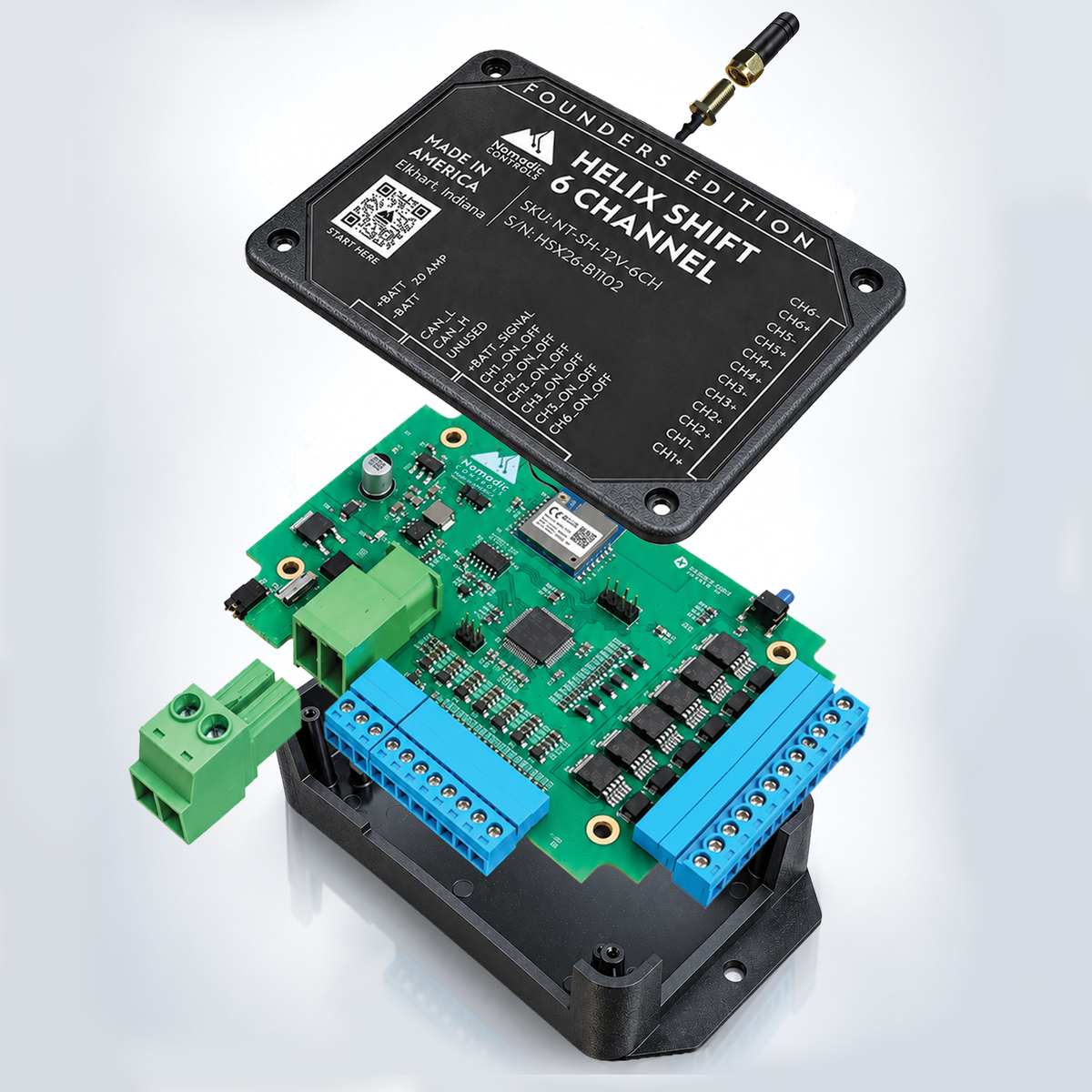
Antenna
Pre-attached
Output Connector
Removable · supplied loose
Power Terminal Plug
+BATT / −BATT · supplied loose
Terminal Requirements
See latest installation manual
Specification Authority

Plan from this page. Install from the current documentation.

The production controller labeling and latest approved documentation for the installed hardware revision take precedence over an older website, drawing, photograph, manual revision, or specification sheet.

Specs established. Next: see how Shift 6CH fits within the Helix ecosystem.
Nomadic Controls · Helix

Part of the Helix Ecosystem.

Different products for different jobs throughout the build.

The Helix family extends beyond six-channel DC control into system hubs, awning control, climate, tank monitoring, leak detection, and vehicle visibility for modern vans, RVs, campers, and mobile electrical systems.

Explore the Family

Add only the products that solve a real function in the vehicle. Being part of the same Helix family does not mean every product is required for every build.

Swipe to explore the Helix family
Product family established. Next: the practical questions customers ask before choosing Shift 6CH.
Common Questions

Helix Shift 6CH Frequently Asked Questions.

The practical answers to know before you wire it in.

Shift 6CH is a purpose-built 12V DC controller, not a universal switch for every electrical load. These answers cover the questions that matter most when choosing and planning the controller for a van, RV, camper, or mobile electrical system.

01 Can Helix Shift 6CH control any 12V device?

No. Being a 12V device does not automatically make a load compatible. The connected equipment must meet the controller's published voltage, polarity, continuous-current, startup or inrush-current, control-method, and output-mode requirements.

A load drawing less than 8A is not automatically approved simply because it falls below the per-channel current limit.

02 Can I use Shift 6CH in a 24V or 48V electrical system?

Not directly from 24V or 48V. Shift 6CH is a 12V DC controller with an approved input range of 11.0–16.0V DC.

A vehicle can use another primary system voltage, but Shift 6CH itself must still receive power within its approved input range. Do not connect the controller directly to a source outside that range.

03 How much current can Shift 6CH handle?

Shift 6CH supports a maximum of 8A on any individual output channel and 18A combined across all active outputs.

Six 8A channels do not create 48A of simultaneous controller capacity. The installed and source-side 20A fuse requirements are also separate from the 18A combined-output limit.

04 Does Shift 6CH require a Helix Pulse hub?

No. Shift 6CH is added directly through the Nomadic Helix Controls app. Initial pairing uses a Bluetooth-enabled phone or tablet and a compatible 2.4GHz Wi-Fi network.

Helix Pulse is a separate product for builds that need its broader hub and system-management functions.

05 Do I have to use the app every time I control a channel?

No. Shift 6CH provides six inputs for compatible normally open momentary switches, one corresponding to each output channel.

The app is still used for pairing and configuration and provides access to channel naming, operating modes, brightness where applicable, automation, and Status information. A hardwired switch sends a command to the controller; it is not an electrical disconnect or isolation device.

06 Can Shift 6CH dim 12V lights?

Yes, when the connected load is compatible with Dimmable mode. Brightness can be adjusted through the app for a channel configured in Dimmable mode.

Do not assume every product marketed as a 12V or dimmable light is compatible. Verify stable operation with the actual connected lighting during commissioning.

07 Can Shift 6CH control an external relay?

Yes, within the approved relay architecture. A compatible 12V automotive relay coil may be controlled in Standard mode when the relay includes a suppression diode or another approved flyback-suppression device.

The equipment switched by that relay must use its own separate, properly fused power circuit. Using a relay does not automatically make every otherwise incompatible load suitable for the installation.

08 What fuse protection does Shift 6CH require?

The controller includes an installed 20A MINI blade fuse. The specified replacement is Littelfuse 0297020-WXNV or an exact equivalent approved by Nomadic Controls.

Installation also requires a separate 20A DC-rated source-side fuse in the positive supply conductor as close to the power source as practical. Nomadic Controls recommends properly sized DC-rated protection between each output and its connected load.

The 20A fuse requirements do not change the controller's 18A maximum combined-output rating.

09 Is Shift 6CH waterproof or designed for exterior installation?

No. Shift 6CH is not sealed and must be installed in a dry, protected interior location.

Keep the controller away from water intrusion, leaks, condensation, direct spray, wash-down, direct weather, heavy dust, corrosive material, and areas where the controller or wiring may be physically damaged.

10 Does Shift 6CH support CAN or RV-C integration?

Shift 6CH includes CAN_H and CAN_L terminals for an optional approved CAN-based integration. Use those terminals only with approved, product-specific integration documentation.

The presence of CAN terminals does not establish blanket compatibility with every CAN network or generic RV-C compatibility. Leave CAN_H and CAN_L disconnected when an approved CAN integration is not being used.

Application Support

Have an unusual load? Ask before you wire.

Send us the device or load type, system voltage, running current, startup or inrush current where applicable, and what you want the circuit to do. That gives our support team enough context to help evaluate the application.

Ask Nomadic Support
Questions answered. Next: bring the page back to the reason you wanted better control in the first place.
Modern camper van interior with layered lighting
Nomadic Controls · Helix Shift 6CH

Control the Build. Not the Complexity.

A focused six-channel 12V DC controller for compatible circuits in vans, RVs, campers, and professional mobile builds.

Configure through the Helix app, keep compatible physical controls where they make sense, and add useful automation without turning a focused group of circuits into a whole-vehicle control project.

6 Controlled Channels
APP Helix Controls
SW Hardwired Inputs